Word to PDF
An account and payment are required for PDF-to-JPG, all other converters and Premium tools. No free Premium jobs.
Compare free and paid accessConvert Word files to PDF with AlphaPDF Premium. Review format-specific options and sign in to start.
Prepare a letter, contract or report for sharing as a PDF. Word headings can become a PDF outline, making a long document easier to navigate.
Check font substitutions, headers and page breaks against Word's print preview.
Sign in to start
Premium processing keeps every input and result scoped to your own account.
Log inNew to AlphaPDF? Create an account
What it does
Word to PDF converts .doc and .docx files into PDFs that keep their layout on any screen or printer. Headings in the document can become bookmarks in the PDF, so a long report is easy to move around in.
When to use it
Use it when a job application, grant portal or client asks for a PDF, or when you want to be sure your formatting survives on someone else's computer. It is also a sensible last step before printing, because the PDF shows exactly which lines fall on which page.
How to use Word to PDF
- Sign in with an account that has Premium access.
- Upload .doc, .docx files. Each file can be up to 50 MB, with up to 25 files per batch.
- Review the available settings and choose a 1, 7 or 30-day retention period, or Delete now to keep the result for just an hour.
- Start the job, then download and check the result before its retention period ends.
Related conversion options
Before you start
Check font substitutions, headers and page breaks against Word's print preview.
Unusual fonts may be replaced with similar ones. Compare page breaks with Word's print preview for documents where they matter.
Processing limits
Up to 50 MB per input; 25 files and 500 MB per batch. PDF limit: 2000 pages. Up to 2 active jobs per account. Output limit: 1000 MB. Renderer limits can reject especially large pages or images.
Example result
Real Word to PDF output from a synthetic input. PDF output shown as rendered pages.
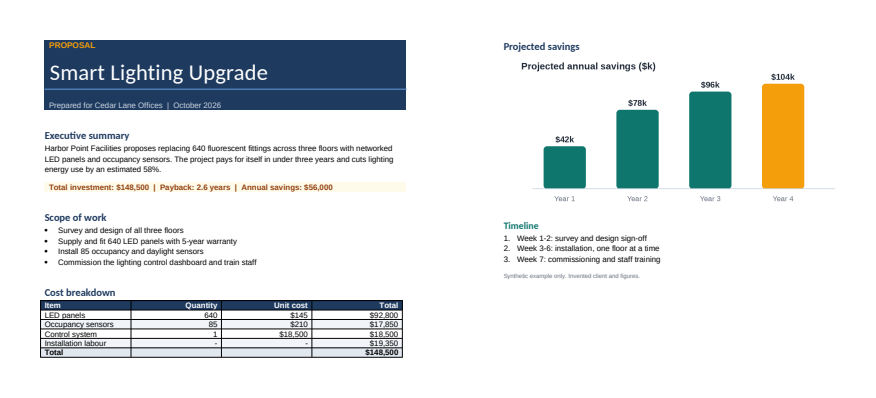
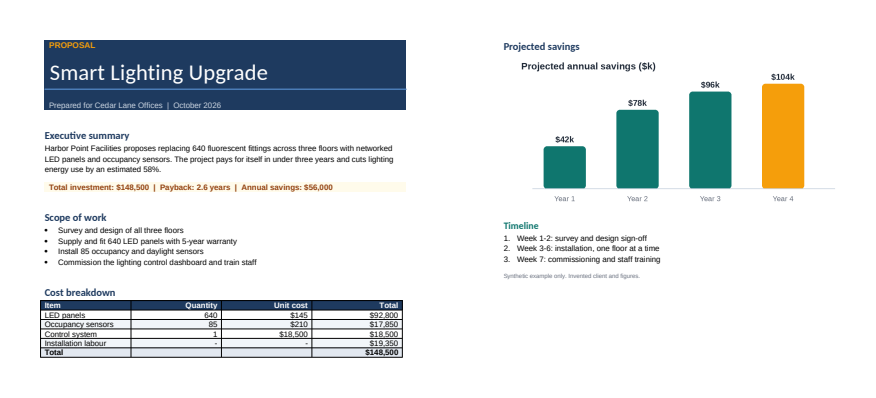
Download example input · Download result
Example details & evidence
Real Word to PDF output from a synthetic input. PDF output shown as rendered pages.
Examples use synthetic files, not customer documents. Generation notes and SHA-256 hashes.
Common questions
Will my headings become bookmarks?
Headings that use Word's heading styles can become a PDF outline. Plain bold text will not.
Are tracked changes shown?
Accept or reject changes before converting if you want a clean copy.
Do old .doc files work?
Yes. Both .doc and .docx are accepted.
Can I convert many documents at once?
Yes. Upload a batch and each document becomes its own PDF.